外设天下 - 电脑外设发烧友聚集地

求指导,求长姿势。XAI的一个问题

查看数: 2204 | 评论数: 7 | 收藏 0
关灯 | 提示:支持键盘翻页<-左 右->
    组图打开中,请稍候......
发布时间: 2012-6-3 12:02

正文摘要:

图上画圈的地方,谁能给咱小白解释解释。 什么是按键距离,而且我用过的XAI  10th貌似没有这个功能。 有版本差异还是什么的? 最后一句话“当你抬起鼠标改变位置时,鼠标会关闭传感器。” ...

回复

高级模式
B Color Image Link Quote Code Smilies |上传

本版积分规则

回复 alangl 发表于 2012-6-3 14:37
半吊子粗心翻译,就这态度做产品,想超过罗技,微软,还得继续努力呀
回复 wewill 发表于 2012-6-3 14:16
坐等大神
回复 huyannnn 发表于 2012-6-3 13:52
不知道,求科技帝翻译帝芯片帝解答。
回复 ll27959 发表于 2012-6-3 12:42
cowaremono 发表于 2012-6-3 12:34 PM
SS中国:

求详细解释9500的两段式响应高度。

具体什么表现?
回复 cowaremono 发表于 2012-6-3 12:34
本帖最后由 cowaremono 于 2012-6-3 12:44 PM 编辑

SS中国:
自动调节按键距离
确保1mm按键距离,SteelSeries Xai上的传感器能根据表面材质自动调整按键距离。如果是对灵敏度要求不高的玩家,设置最小按键距离显得尤为重要。当你抬起鼠标改变位置时,鼠标会关闭传感器。


SS国际:
Automatic lift distance
To make sure you always have a 1mm lift distance, the sensor on the SteelSeries Xai automatically adjusts the lift distance, depending on the surface you’re using. If you are a low sensitivity gamer a minimal lift distance is extremely important so that the mouse will shut off the sensor when you lift your mouse up to change position.


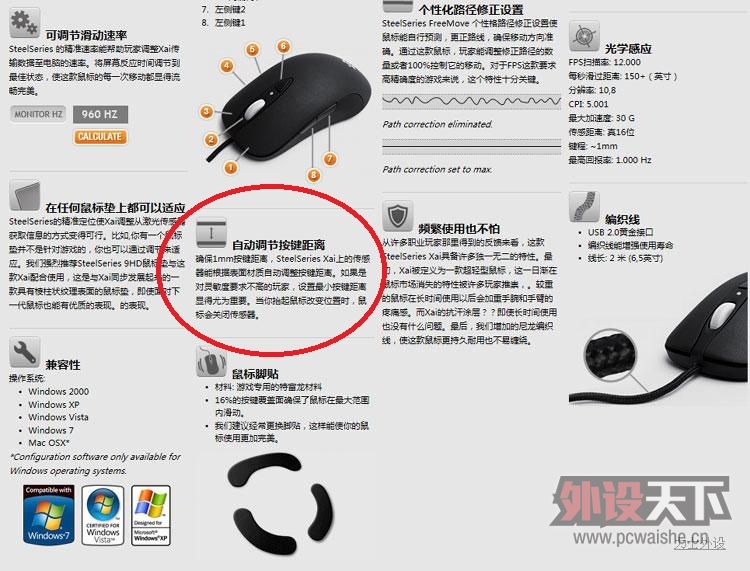
1、这说的怎么看都应该叫【响应高度】【静默距离】而非【按键距离】,SS.com的英文也印证了这一点;
2、根据英文的意思,9500会在一个相应低的高度自动关闭;
3、综合9500的近期表现,我推断这引擎的本身特性也恰恰导致了其两段式响应高度。细心的9500持有者应该都能有所发现。
回复 Mr.rui 发表于 2012-6-3 12:21
二连、等大神解答
回复 Mr.rui 发表于 2012-6-3 12:20
同求、