|
|

本帖最后由 xmiangui 于 2010-9-9 21:54 编辑
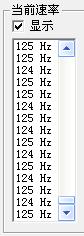
闲着没事下了这个软件测了测俩鼠标 分别是IE3.0FK和 Iron Lady 其他鼠标没在学校也没法测
软件上面写着“测试得分相差越大,鼠标越不稳定;得分越高,鼠标越快” 这个越快和DPI没有关系的吧?
Sunny丶荣 发表于 2010-9-8 13:21 
Mouse Rate Checker?
我不记得原版上有写这句像Benchmark软件一样的话......
this little program measures and displays the sample rate of a mouse. the sample rate (in Hz) tells how often (per second) the mouse sends information to your computer.
there are some utilities to change the sample rate of ps/2 mice (the sample rate of serial and usb mice can't be changed afaik). this program is useful to verify the effects of these programs. you find a collection of these utilities e.g. on the mouse resouce page of blue's news, a very good 3d game related news site.
the standard sample rate of serial mice is 40Hz, ps/2 mice are also sampled with 40Hz on windows 95/98 but with 60Hz on windows nt. mice with usb interface are sampled 125 times/sec, but unfortunately they only work with windows 98 and windows 2000.
40 or 60Hz is not very much. if you move your mouse quickly you will see that the mouse pointer doesn't follow your movement smoothly but instead it will jump from position to position. in 'normal' windows applications that 'normally' doesn't matter, 40 or 60Hz is enough for most people (as long as they haven't tested 200Hz :-), but there is one kind of programs which suffer from a low sample rate: 3d games!
3d games? yes. imagine you bought a fast pc, a nice 3d accelerator and are playing your favorite action game. your graphics hardware is often capable of displaying 80, 100 or even more fps (frames per second) in some scenes. but when you turn using the mouse, the game can only update your position inside the 3d environment after it receives a new position from the mouse. and this happens only 40 or 60 times a second! so on some frames the game will receive one (or more if the scene takes long to render) mouse sample and on other frames not even one. this results in a very jerky movement. this is also the reason, why many 3d games offer you to enable a 'mouse filter'. this filter calulates the average of some mouse samples and will assign every rendered frame a calulated mouse sample. this will smooth the movement very well but results in some lag, i.e. it takes a while for the game to react on your mouse movements.
我个人的理解是,这款软件能通过捕获操作系统的指针信号、除以时间并记录Hz信息。以便于用户推测自己的鼠标回报率是多少,显然操作系统在HAL层已经做过不开放接口的指针处理了,所以根据用户鼠标的移动获得出差异很大的Hz值。
作者本身的建议只是根据获取到的数据判断鼠标的回报率,比如是 125、200以及以后的500、1000。在写这个软件的时代,你测出一堆120+的Hz以及一些其他数值,自然就知道这是USB口的鼠标;测出一堆 190+的Hz就知道是PS/2口设置过回报率的鼠标了。作者那个时候还建议大家都该去用PS/2 200Hz呢……
显然,这个软件的设计初衷不是做Benchmark。我的大傻 + HP笔记本,鼠标设置为500Hz模式,手快可以出到1K,手慢么,自然可以出到很低......
|
|





 微信分享
微信分享 变色卡
变色卡 显身卡
显身卡